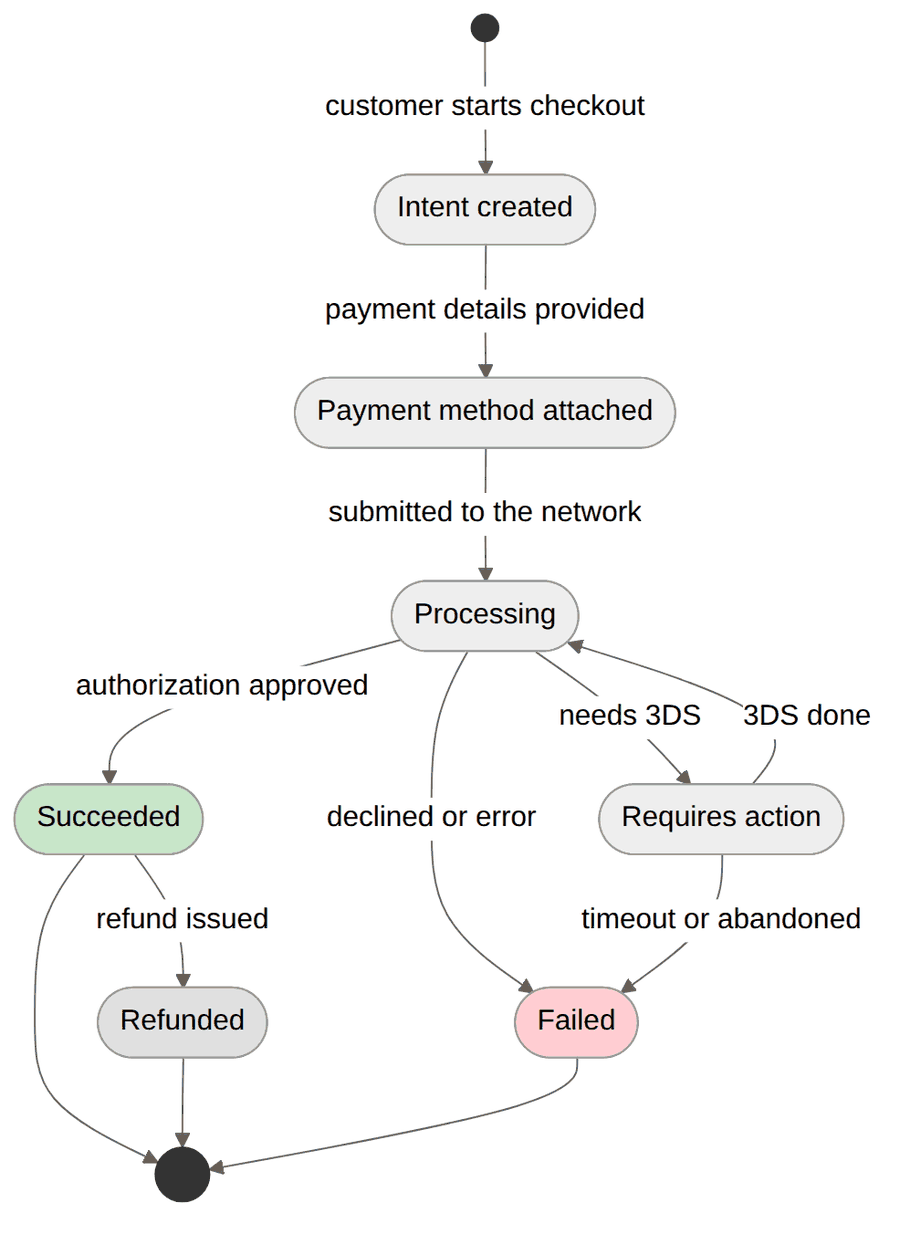
Different providers use different terminology (Stripe calls them "payment intents", PayPal uses "orders"), but the underlying state machine is nearly identical across all of them. Learn these core states once and you can build provider-agnostic payment systems.
Most payments move through these states, whatever your provider calls them:
1. Intent Created
The customer expresses intent to pay, but no money has moved yet. A payment record exists in your system, nothing has been charged or reserved, and the customer can still abandon the payment - and a meaningful percentage will, especially if your checkout is slow.
Example scenarios:
- Customer clicks "Buy Now" and you create a payment intent.
- Subscription is set up but first payment hasn't processed.
- Customer is on the checkout page but hasn't submitted payment details.
2. Payment Method Attached
The customer provides payment details (credit card, bank account, etc.). The payment method is validated and ready, no money has moved yet, but you can now attempt the charge.
Common issues:
- Invalid payment methods (expired cards, insufficient funds).
- Payment method requires additional authentication (3D Secure).
- Customer changes their mind and wants to use a different payment method.
3. Processing/Pending
You've submitted the payment to the network. Money has started moving, the outcome isn't known yet, and the transaction could still succeed or fail (Schrödinger's transaction).
The "processing" state is where many developers get tripped up. Your system has to handle long delays: some payment methods like bank transfers can stay in this state for days. Never assume processing means success.
Payments stay in this state because of bank processing delays (especially for ACH/bank transfers), additional fraud checks, currency conversion on international payments, or manual review triggered by risk systems.
4. Requires Action
The payment can't proceed without an additional step from the customer - typically authentication. This is common for European payments under SCA, and the payment will fail if the customer doesn't complete the required action.
Many developers only implement success and failure states, completely ignoring "requires action". This breaks checkout for European customers who are required by law to complete Strong Customer Authentication. If you're processing international payments, this state is mandatory.
Examples:
- 3D Secure 2 authentication (biometrics, app confirmation, or one-time code).
- Bank redirect for online banking payments.
- SMS verification for certain regions.
SCA Exemptions: Not every payment requires authentication. The following are exempt under PSD2:
- Low-value transactions: Under 30 EUR (capped at 100 EUR cumulative or 5 transactions)
- Recurring payments: After the first authenticated payment, subsequent charges are exempt
- Trusted beneficiaries: Customers can whitelist merchants in their banking app
- Transaction Risk Analysis (TRA): Low-risk transactions below certain thresholds (500 EUR for merchants with <0.13% fraud rate)
- Corporate payments: B2B transactions using dedicated corporate cards
Your payment provider usually requests these exemptions for you, but knowing the list helps when you're debugging why a payment landed in "requires action".
5. Succeeded
The payment has been processed and money has moved. Funds have been captured from the customer's account, money will be deposited to your account minus fees, and you can fulfill the order or provision access.
"Succeeded" doesn't mean the money is in your bank account yet. It means the charge went through and the funds are on their way: "your package has shipped", not "delivered."
6. Failed
The payment couldn't be processed. No money has moved, the customer needs to retry with a different method or resolve the underlying issue, and you should not fulfill the order.
Common failure reasons include insufficient funds, a decline from the issuing bank, invalid payment details, fraud prevention triggers, and technical issues at the processor.