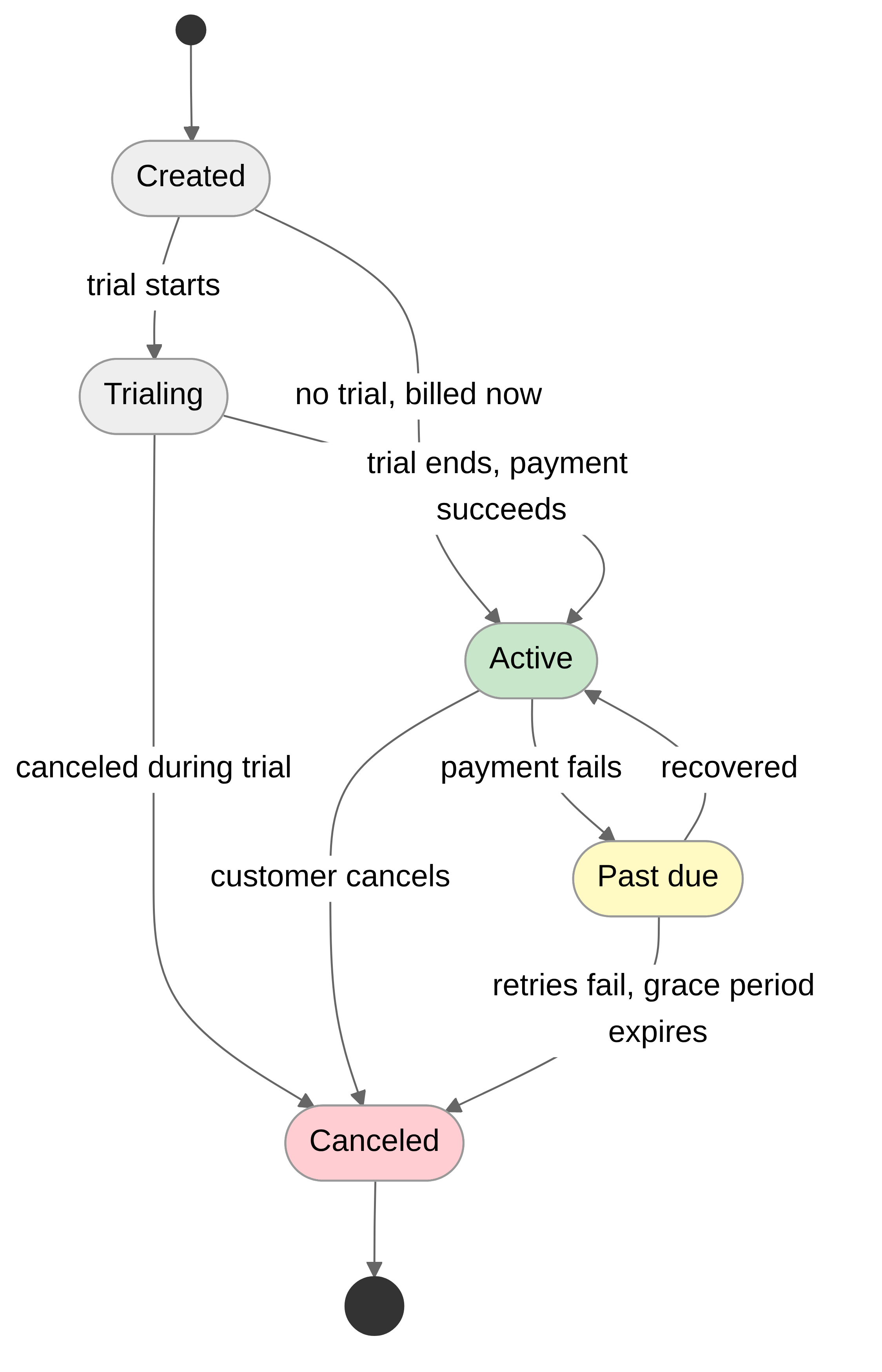
A Stripe subscription is an object that bills a customer on a schedule. Each period Stripe creates an invoice, tries to collect it, and moves the subscription's status to match what happened. Your job is narrower than it looks: create the subscription, read the status, and grant or remove access when it changes. Stripe handles the invoices, the retries and the transitions (Stripe, checked November 2026).
On price, Stripe Billing costs 0.7% of Billing volume on pay-as-you-go, on top of the normal card fee, or a monthly plan from $620 a month on a one-year contract (Stripe pricing, checked November 2026). A $50 monthly renewal on a US card costs $1.75 in processing (2.9% + $0.30) plus $0.35 for Billing: $2.10, or 4.2%.
The eight statuses
From Stripe's subscription docs. The access column is the decision your code makes.
| Status | What it means | Grant access? |
|---|---|---|
incomplete | Created, first payment not made yet. The customer has 23 hours to pay | No |
incomplete_expired | The first payment never happened within 23 hours. Nothing is billed; create a new subscription | No |
trialing | In a trial. Stripe says you can safely provision | Yes |
active | In good standing | Yes |
past_due | The latest invoice failed or wasn't attempted. Invoices keep coming, retries may run | Your call: usually yes, during the retry window |
unpaid | Retries ended and your settings chose unpaid. Invoices stay in draft and aren't charged | No. Stripe says to revoke access here |
canceled | Ended. Terminal, can't be updated | No |
paused | A trial ended with no payment method and you chose pause, or you paused it with the pause endpoint. No new invoices | No |
Two traps sit in that table. First, incomplete is the state of every new subscription that needs an immediate payment, so access belongs on active (or on invoice.paid), never on creation. Second, past_due doesn't guarantee another payment attempt; what happens after the last retry is a Dashboard setting: cancel, mark unpaid, leave past due, or pause (Smart Retries).
Creating one
The pattern for a custom form: create the subscription incomplete, send the invoice's confirmation secret to the browser, and let the Payment Element confirm it. This is the current shape from Stripe's build guide; if your code expands latest_invoice.payment_intent, it was written against an older API version.
import stripe

subscription = stripe.Subscription.create(
    customer=customer_id,
    items=[{"price": price_id}],
    payment_behavior="default_incomplete",
    payment_settings={"save_default_payment_method": "on_subscription"},
    expand=["latest_invoice.confirmation_secret"],
)
client_secret = subscription.latest_invoice.confirmation_secret.client_secret
Smart Retries doesn't retry that first payment while the subscription is incomplete, so a decline at signup is yours to handle on the page, not Stripe's to recover later. If you'd rather not build the form at all, a Checkout Session in subscription mode does the same job; Checkout vs Elements covers that choice.
Following the status with webhooks
Stripe's guide says to grant access from customer.subscription.created, .updated and .deleted, which all carry the subscription and its status. One handler covers the lot. Verify the signature first, always.
import stripe

ACCESS = {"trialing": True, "active": True, "past_due": True}  # past_due: your grace period


def handle_stripe_event(payload: bytes, sig_header: str, secret: str) -> None:
    try:
        event = stripe.Webhook.construct_event(payload, sig_header, secret)
    except (ValueError, stripe.SignatureVerificationError):
        raise PermissionError("bad Stripe signature")

    if event.type.startswith("customer.subscription."):
        sub = event.data.object
        set_access(sub.customer, ACCESS.get(sub.status, False))
    elif event.type == "invoice.payment_failed":
        invoice = event.data.object
        notify_card_problem(invoice.customer, attempt=invoice.attempt_count)
Webhooks arrive out of order and more than once, so set access from the status in the event rather than toggling it, and make the handler safe to run twice.
Proration
Change the price or quantity mid-period and Stripe prorates, to the second by default. Stripe's own example: moving from a $10 to a $20 monthly plan halfway through gives a $5 credit for unused time and a $10 charge for the rest of the month, so the customer owes $5 (Stripe). proration_behavior decides when that money moves:
| Value | What happens |
|---|---|
create_prorations (default) | Credit and debit lines wait on the next invoice |
always_invoice | Stripe invoices the difference now. What most customers expect on an upgrade |
none | No proration this time; the next invoice bills the full new price |
Show the customer the number before they click. Preview it with the same proration_date you'll apply, because a per-second proration changes between the preview and the update otherwise:
import time

proration_date = int(time.time())
items = [{"id": sub["items"]["data"][0].id, "price": new_price_id}]

preview = stripe.Invoice.create_preview(
    customer=sub.customer,
    subscription=sub.id,
    subscription_details={"items": items, "proration_date": proration_date},
)
# Show preview.amount_due, then on confirm:
stripe.Subscription.modify(
    sub.id, items=items,
    proration_behavior="always_invoice", proration_date=proration_date,
)
Two behaviors catch people out. Negative prorations aren't refunded automatically; they sit as credit. And if the customer has an unpaid invoice for the current period, Stripe still credits unused time on the old plan, which can pay out time nobody paid for. Stripe's fix is proration_behavior="none" while the latest invoice is unpaid.
Pausing: two different things
Stripe has two features both called pause, and they do opposite things to access:
- Pause payment collection (
pause_collection). The subscription staysactive, the customer keeps access, and invoices are kept as drafts, marked uncollectible or voided. It's a free grace period (Stripe). - Pause the subscription (the pause endpoint). Status becomes
paused, invoicing stops, and Stripe sendscustomer.subscription.pausedso you can remove access. It needs flexible billing mode, and you can't pause a subscription that'sunpaid,incompleteor still in a free trial (Stripe).
The customer portal
The customer portal is a Stripe-hosted page where customers update their card and billing details, switch, pause or cancel subscriptions (immediately or at period end), and view and pay invoices. It can offer a coupon when someone tries to cancel and record why they left. You can switch it on from the Dashboard without code, or create sessions from your app (Stripe):
session = stripe.billing_portal.Session.create(
    customer=customer_id,
    return_url="https://example.com/account",
)
# Redirect the customer to session.url
The portal has no fee of its own on the pricing page; hosting it on your own domain is the $10 a month custom domain add-on (Stripe pricing). The limits worth knowing before you promise it to anyone:
- It can't be shown inside an iframe.
- Plan switching offers at most 10 products.
- Customers can cancel, but not change, subscriptions with multiple products, usage-based prices, trial offers or
send_invoicecollection. - Changes to a
trialingsubscription end the trial and invoice immediately unless you configurecontinue_trial. - Sessions expire if unused for 5 minutes, and within an hour of the last activity.
Dunning hooks
When a renewal fails, the subscription goes past_due and Stripe fires invoice.payment_failed on every attempt, with attempt_count on the invoice. New accounts get Smart Retries by default, up to 8 retries within 2 weeks, and hard declines such as stolen_card or lost_card aren't actually attempted again until the customer adds a new payment method (Stripe). Your part is the email with a link that fixes the card (the portal is that link), and the decision about access during past_due. The full sequence, from the first email to the cut-off, is in the dunning guide.
How to test all of the above without waiting a month. From chapter 9, the free chapter.
Proration, Smart Retries, and Test Clocks
Proration. proration_behavior has three settings, and the wrong one generates support tickets. create_prorations (the default) adds credit and debit lines to the next invoice. always_invoice bills the difference immediately, which is what customers expect on an upgrade. none swaps the price and charges nothing until the next cycle, which is right for a downgrade if you'd rather not issue credits. Chapter 7 has the arithmetic; Stripe does it for you, but you still decide when the money moves.
Smart Retries. Stripe's default dunning is Smart Retries: it picks retry times from what has worked for similar cards, inside the window you set under Billing > Revenue recovery > Retries, and fires invoice.payment_failed on every attempt. Pair it with Stripe's hosted card-update emails so the customer can fix the card without opening a support ticket, and only suspend access after the last retry, not the first failure.
Test clocks. The part of subscriptions you can't test by waiting. A test clock is a frozen timestamp you attach to a test customer; advance it and every trial end, renewal, and retry that would have happened fires, with real webhooks.
clock = stripe.test_helpers.TestClock.create(frozen_time=int(time.time()))
customer = stripe.Customer.create(test_clock=clock.id, email='trial@example.com')
# attach a payment method, then create a subscription with a 14-day trial ...
stripe.test_helpers.TestClock.advance(clock.id, frozen_time=int(time.time()) + 15 * 86400)
# The trial ends, the first invoice is created and paid, and your webhook endpoint hears about all of it
Run three scenarios on a clock before launch: a trial that converts, a renewal on a card that declines and recovers on retry, and a renewal on a card that never recovers. That's the whole dunning path, and it takes an afternoon instead of two months.
The proration cases Stripe's math gets right and your UI still has to explain. From chapter 24.
Watch for these scenarios that trip up many implementations:
- Same-day changes: Customer upgrades and downgrades on the same day - consolidate into single proration
- Free trial upgrades: No credit for unused trial period (it was free)
- Annual to monthly: Convert annual daily rate carefully ($299.99/365 vs $29.99/30)
- Timezone boundaries: Use UTC for all calculations to avoid period boundary issues
- Minimum charges: Some processors reject charges under $0.50 - accumulate small prorations
Before you launch
- Grant access on
activeorinvoice.paid, never on subscription creation. - Decide what
past_duemeans for access, and write it in code, not in a support macro. - Pick the post-retry outcome in the Dashboard on purpose: cancel, unpaid, past due or pause.
- Preview every plan change with a fixed
proration_date. - Run a test clock through a converting trial, a recovered renewal and a renewal that never recovers. Use the Stripe test cards that decline on purpose.
- Track what churn costs you with the MRR calculator.
Weighing Stripe Billing against a merchant of record that also files the sales tax? See Stripe vs Paddle.
Questions
What are the Stripe subscription statuses?
There are eight: incomplete, incomplete_expired, trialing, active, past_due, unpaid, canceled and paused. Grant access on trialing and active, decide your own policy for past_due, and remove access on the rest.
Why is my Stripe subscription incomplete?
Every subscription that needs an immediate payment starts as incomplete. The customer has 23 hours to pay the first invoice; after that it becomes incomplete_expired and you create a new one. Smart Retries doesn't retry that first payment, so handle the decline on the page.
What does the Stripe customer portal do?
It's a Stripe-hosted page where customers update payment methods and billing details, switch, pause or cancel subscriptions, and view and pay invoices. You can turn it on from the Dashboard without code or create sessions with stripe.billing_portal.Session.create. It can't be shown inside an iframe.
How does Stripe prorate a plan change?
To the second, by default. Moving from a $10 to a $20 monthly plan halfway through credits $5 of unused time and charges $10 for the rest of the month, so the customer owes $5. proration_behavior decides whether that waits for the next invoice (create_prorations, the default), is invoiced now (always_invoice), or is skipped (none).
How much does Stripe Billing cost?
On pay-as-you-go, 0.7% of Billing volume on top of the card fee, checked November 2026. A $50 monthly renewal on a US card costs $2.10: $1.75 in processing plus $0.35 for Billing.
What happens to a Stripe subscription when payment fails?
It moves to past_due and Stripe retries. New accounts get Smart Retries by default, up to 8 retries within 2 weeks. After the last retry, your Dashboard setting decides whether it becomes canceled, unpaid or paused, or stays past_due.